Posts

Showing posts with the label Remote connection

How to select data from another sql server

We have a target to run a JOB on server to import data from another SQL server instance. For example take Server 1 - Main Server 2 - From which we have to import. If you have admin rights on both the servers you can "Link the servers" under "Server Objects>>Linked Servers" Right click on the same and provide all the parameters of server or as an alternate you can run following command. EXEC sp_addlinkedserver @server = 'db1', @srvproduct = 'SQLServer OLEDB Provider',  @provider = 'SQLOLEDB',  @datasrc = 'server2',  @provstr='User Id=sa; Password=abc' The above command parameters:-  @server- An identification name of server. @datasrc- Your server instance name or IP. Your SQL will look like:- Select * from db1.dbname.dbo.tablename If sometimes the server will get changed, the above statement gives you the option to change the user name, password and server at any points of time without effecting the ...
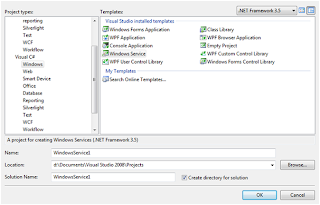
How to Make Windows Service Using C# 2008

Image
I have an task to run a Stored procedure after every 30 minutes. My first choice is to create a job on Sql server. But I also have to write a log file along with the stored procedure. Now, my choice will be Windows service. Creating a windows service is a very easy task but how to deply...... let me explain how to work with windows service. Creating a program that can run in the background of the operating system has any benefits, this is very important as the program can run without a graphic user interface. Complex service that are to run are longer time, and without the need the user to login the system. Windows services are harder to develop, debug, and test. But if you software are to run in server that require to start up automatically with the server is turn on, Windows service is your choice. Creating your skeleton project in Visual Studio 2008 To create a Windows Service project in Visual Studio 2008, you must select from the Visual C# Windows Projects. Give your Windows Servi...

An error has occurred while establishing a connection to the server. When connecting to SQL Server 2005 ,SQL Server does not allow remote connections

Image
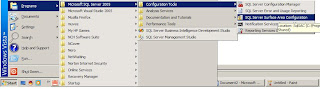
By default Sql server 2005 does not support remote connection using TCP/IP. This error generally occur when you try to connection a remote or network server using IP address or server name. Now the question arises how to make enable remote connection for sql server 2005. Here is the solution:- Start >> Programs>> Microsoft SQL Server 2005 >>Configuration Tools >>SQL Server Surface Area Configuration This following images display graphical represents of solution. Follow steps highlighted in red Follow steps highlighted in red Now press apply and ok. By pressing OK. the current settings will not take effect. To make these settings effective you have to restart sql server. Go to start >> Run >> services.msc press Ok it will dispaly services window. now go to "SQL Server (MSSQLSERVER)", right click and "Restart service to take effect" If still this will not work try restarting your system/pc